By Rob, hero developer at Three Crown Interactive · 2 October 2026
Our endless waves now grow to 300 enemies, and in co-op up to four players throw their biggest spells into that crowd at the same time. On average the game ran fine. In practice it froze for about a third of a second every few seconds.
Game development is a new world for me. But between game-dev communities and AI, I can learn enough to find problems like this and fix them myself. This post is how that went: one day of hunting those freezes, what caused them, and the numbers before and after.
In short
- With 300 enemies, average FPS went from 87 to 115 in a release build.
- The slowest frame went from 340 ms to 37 ms, and later to 24 ms.
- The 1% low (the average of the slowest 1% of frames) went from 10 to 46 FPS.
- Garbage collection runs dropped from 209 to 38 per 30 seconds.
- One fix made the game faster to compute but changed how a spell plays, so we threw it away.
Why we push this hard
We want The Last Bastion to feel like holding the wall against a real horde: hundreds of enemies, not a few dozen, without the game stuttering at the moments that matter. So we deliberately push everything further than a normal wave would, and then run benchmarks to see where it breaks first. Whatever breaks there is what we fix next.
Average FPS hides the stutter
Most people look at average FPS, and 87 FPS sounds fine. But what you feel is the slowest frame. A frame of 340 milliseconds means the whole game stands still for a third of a second: the camera hitches, your click lands late, and a dodge you timed perfectly comes too late.
At 60 FPS a frame takes 16.7 ms, at 30 FPS 33.3 ms. Anything well above that is a hitch you can see. So for every test we look at three numbers: the average FPS, the 1% low and the slowest frame. And we look at the frame time across the whole fight.
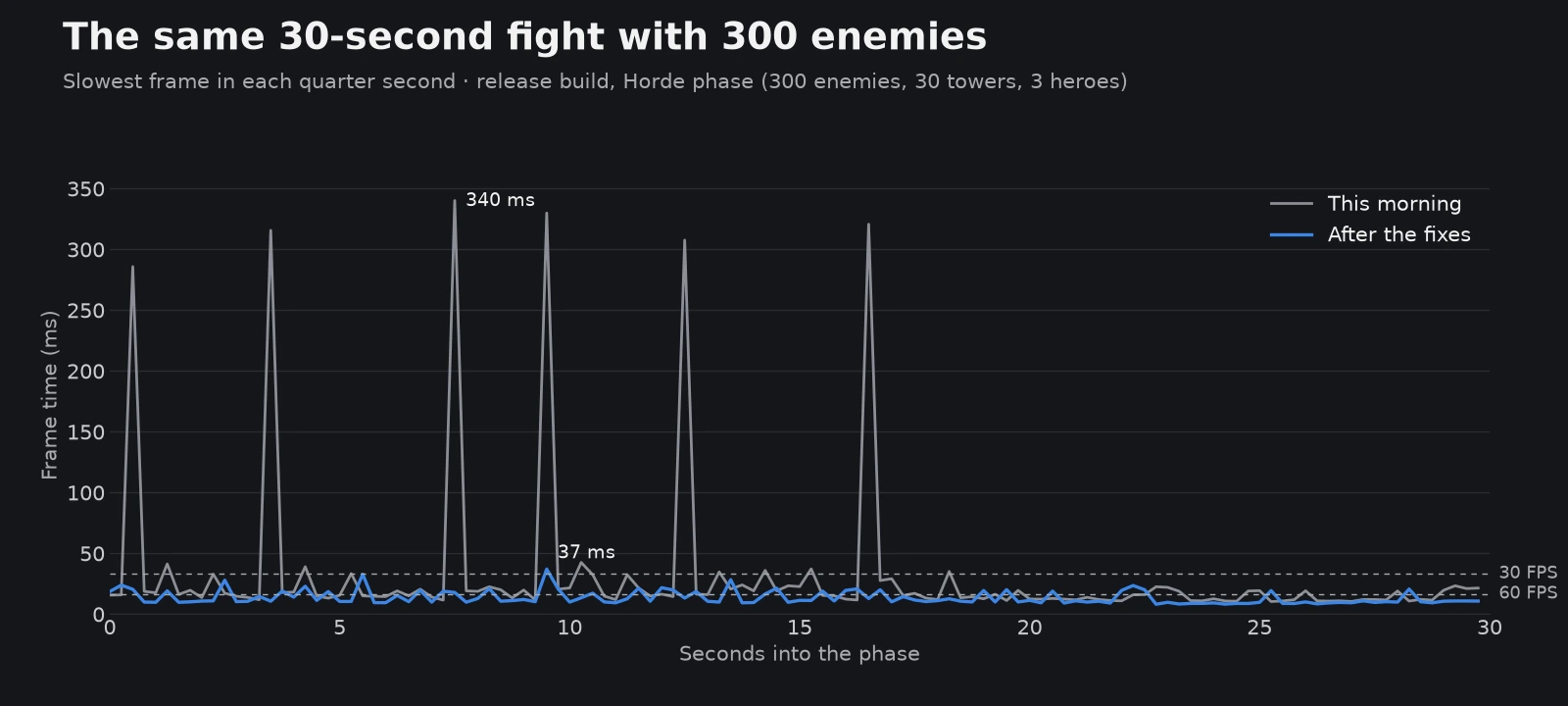
Release build, Horde phase of our benchmark: 300 enemies, 30 towers and three heroes. Each point is the slowest frame in a quarter of a second.
The grey line is how the game ran this morning. The spikes come every few seconds, exactly when the three heroes in the test cast their spells together. Between the spikes the game is fine. The blue line is the same fight at the end of the day.
Where we started
Our benchmark is built into the game's graphics settings. It builds a battlefield with 30 towers and a growing army, has three heroes cast together every 3.2 seconds, and records every frame. (Part 2 is about how we extended this test today.)
This morning's code, in a release build with 300 enemies: 87 FPS on average, a 1% low of 10 FPS, and a slowest frame of 340 ms. Six frames took longer than 100 ms in 30 seconds.
Clue 1: the Fireball volley
To find out what makes a frame slow, you need to know what happened in that frame. We wrote small test scripts that replay the benchmark's spell rounds one by one and profile each round on its own. One round stood out every time: three heroes casting Fireball at once.
The test heroes have their Fire upgrades, so each cast throws three Fireballs and their explosions can set off more explosions. In one frame that meant 12 to 20 explosions, each hitting 35 to 50 enemies, and every hit followed by a burn. That's up to a thousand hits in a single frame. The hits themselves weren't the real problem. The garbage was.
For every hit and every burn tick, the code that adds your elemental Focus bonus built a fresh list of elements and new text keys to look up your talents. Tiny on its own, but a thousand times in one frame it was 80% of all the memory garbage of the volley. In C#, that garbage is cleaned up by the garbage collector, and that cleanup can make the game wait.
The fix was simple: build those keys once, when the game starts. Same behaviour, same damage. The worst Fireball round went from 70 to 35 ms, and the biggest burst of garbage in one frame from 1.75 MB to 0.40 MB (measured in the Editor).
A false alarm
Then we saw frames of 300 to 400 ms with 13 MB of garbage. That looked like a disaster. When we recorded where the memory came from, it wasn't the game at all: it was the version control window inside the Unity Editor, rebuilding its list of changed files in the background. Players never have that window.
That's the lesson I keep relearning: measure in a real build. The Editor adds its own work to every frame. Part 2 shows how big that difference is.
Clue 2: the Arctic Storm chain reaction
With the Fireball fixed, the biggest spikes left came from the Ice mage's ultimate, the Arctic Storm: a 15-metre storm that slows, chills and freezes enemies. Every new freeze inside a storm sets off a Frozen Cataclysm, a small ice explosion that also chills the enemies around it.
With 300 enemies packed together and three storms overlapping, that became a chain reaction inside one frame. A freeze set off a Cataclysm in every storm around the enemy. Those explosions froze the neighbours, their freezes set off more Cataclysms, and so on. In the Editor we measured one frame of 805 ms; in the release build, frames of 227 to 320 ms.
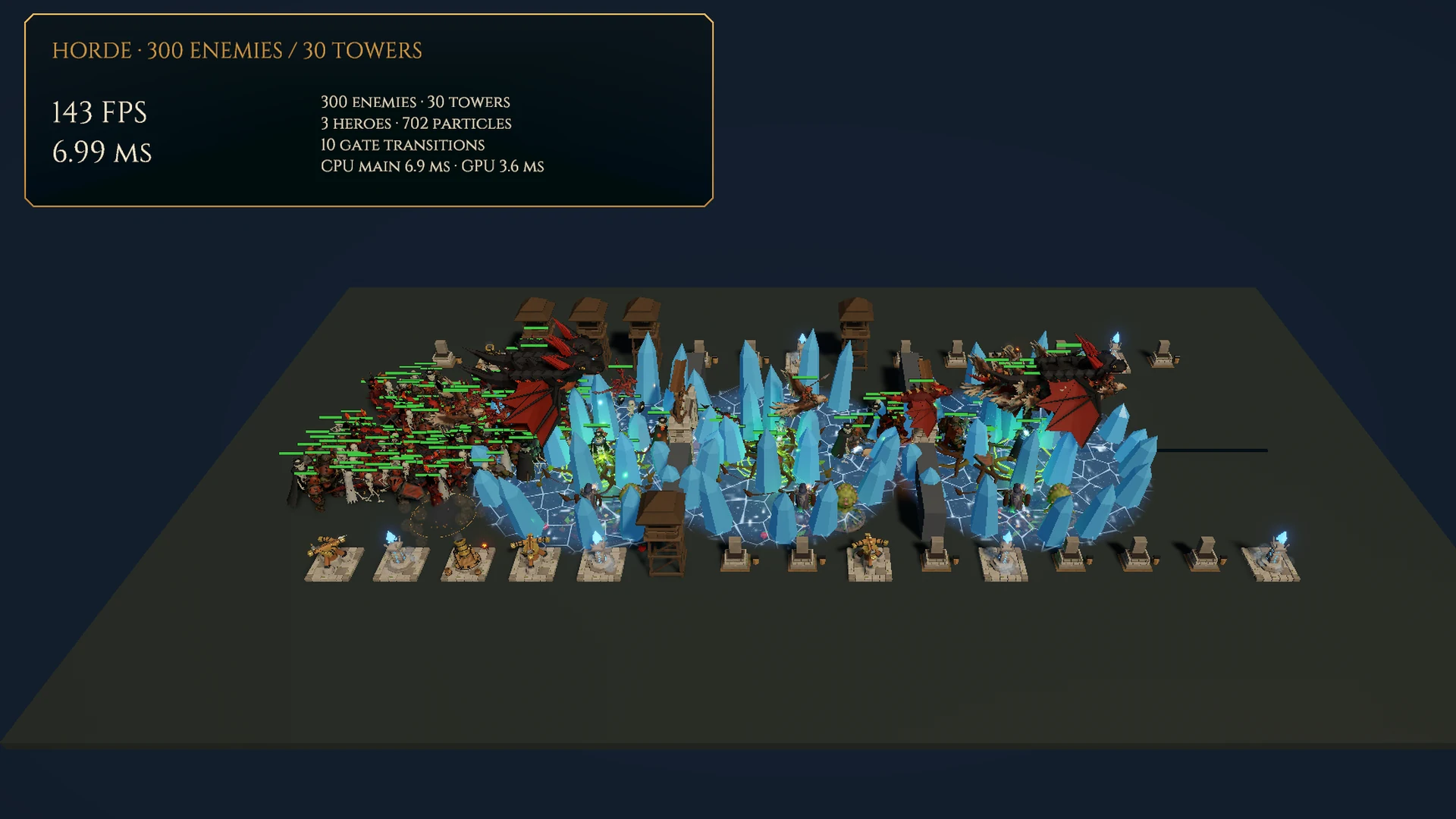
Release build, tonight. The numbers top left are the test's own live counter.
Here the fix is partly a design decision, and I took it as one: one Cataclysm per freeze, from the storm of the mage who froze the enemy, and a freeze caused by a Cataclysm doesn't set off another Cataclysm in the same frame. A frozen crowd still cracks open, just not all in one frame. The visual effects got a budget too: at most 12 ice bursts and 12 frozen shells are built per frame, and the rest follow a frame later.
The fix we threw away
Later in the day we tried to make the storm cheaper still. The first idea: put the Cataclysms in a queue and set them off over the next few frames. Less work per frame, right?
The measurements said no: 6% fewer FPS. Delaying the explosions gave the storm time to freeze the neighbours itself first, and each of those freezes set off its own Cataclysm. More explosions, not fewer. Without meaning to, we had changed how the spell plays.
That's a line I don't want to cross. A performance fix may change when the computer does the work, not what happens in the game. So we dropped that version and did two other things. The storm's damage tick now hits at most 60 enemies per frame (nearest first, as before), while each Cataclysm still explodes immediately. And frozen shells are reused instead of being built fresh each time.
In a direct before-and-after test, run in turn, the slowest frame went from 36–41 ms to 24 ms and the 1% low from 42–43 to 48–49 FPS. The average dropped by about 3 FPS, because more ice effects now actually get drawn instead of skipped. That's a trade I'm happy with.
The results, patch by patch
To know what each fix did on its own, we built the same benchmark four times as a release build, each time with only the hero code changed, and ran them one after another on the same PC.
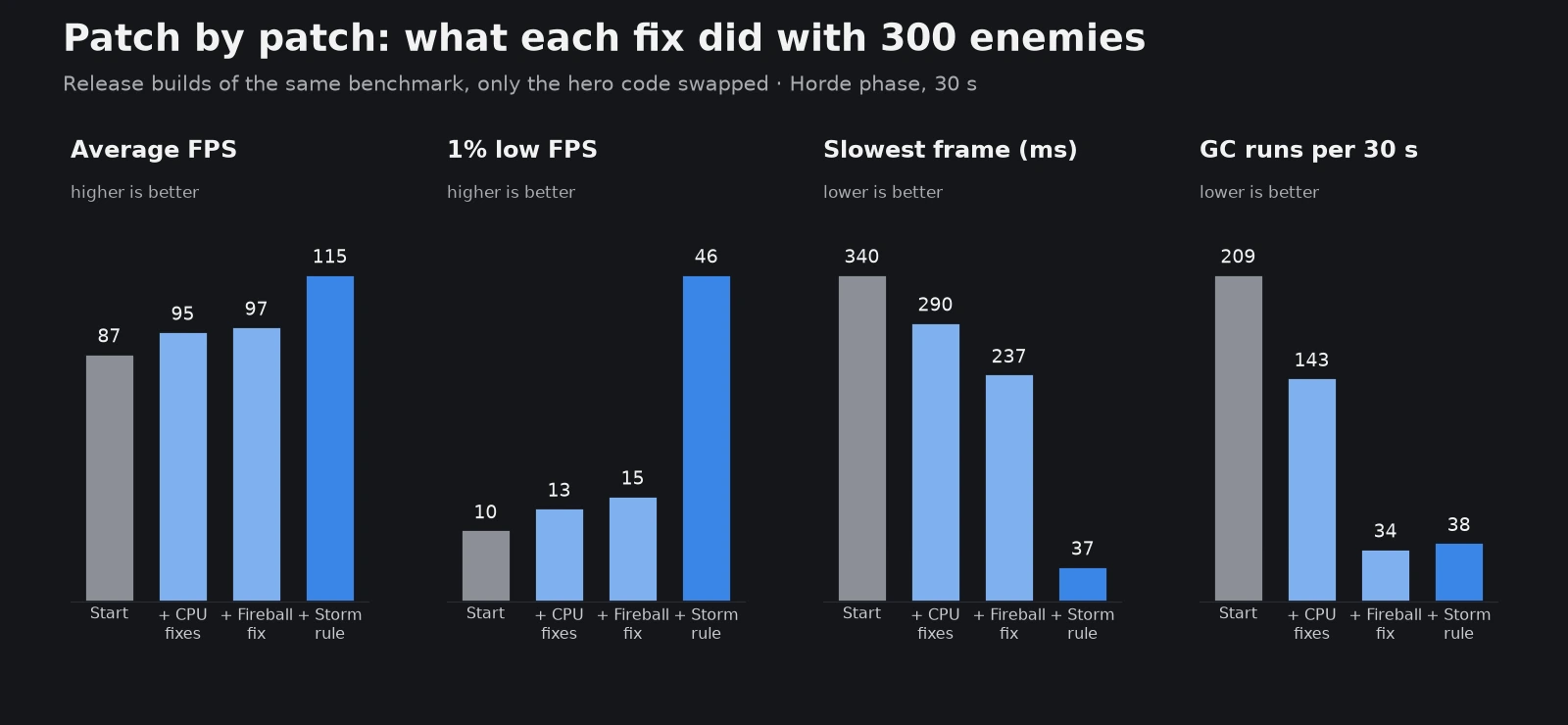
Release builds, Horde phase (300 enemies), 30 seconds each. "CPU fixes" are earlier hero optimisations brought over from a test branch, "Fireball fix" is the garbage fix above, "Storm rule" is one Cataclysm per freeze.
- Average FPS: 87 → 95 → 97 → 115
- 1% low: 10 → 13 → 15 → 46 FPS
- Slowest frame: 340 → 290 → 237 → 37 ms
- Frames slower than 100 ms: 6 → 5 → 6 → 0
- Garbage collection runs per 30 seconds: 209 → 143 → 34 → 38
With 200 enemies the average went from 152 to 174 FPS, and the slowest frame from 189 to 21 ms.
What this means when you play
The goal isn't a high number in a test. It's that a fight with 300 enemies and four heroes keeps responding when everyone throws their ultimate at the same moment. That's exactly when you want to feel powerful, and exactly when the game used to hitch.
There's more to do. The game now spends almost all its time on one CPU core while most of the others wait; that's for a later post. In part 2 I'll show how we made the test itself trustworthy: heroes with swords and mauls, the Ravensklif level with more than 300 orcs, and a co-op check.
How we measured
- PC: AMD Ryzen 7 7700, AMD Radeon RX 7800 XT, 32 GB RAM, Windows 11.
- Settings: 1920 × 1080 window, the game's current graphics preset, VSync and FPS limits off during the test.
- Build: a Unity 6 release build (Mono scripting backend), not the Editor, unless a number says "Editor".
- Test: our built-in battle benchmark. Fixed random seed, 4 seconds of warm-up left out, 30 seconds measured per phase. Enemies have a million health points and are recycled, so the load stays the same.
- Comparisons: builds made the same day that differ only in the hero code, run one after another. Other programs on this PC can cost up to 10% FPS, so we only compare runs made back to back, never against an older run.
- Limits: one PC, and a test battle instead of a real match with players. These changes haven't been playtested yet, and we haven't measured other hardware.
About me
I've been gaming for almost 35 years, and in daily life I work in coding and automation at enterprise level. Making a game with my friends is a dream I've had for a long time. Now I know what feels good, what I'd want to play myself, and hopefully others too. So I'm not easily satisfied with my designs: heroes have to feel truly different, with unique mechanics that make each one their own and their own play style. Designed because it's fun, not because it fills time.
With the help of AI, I can now actually build those ideas. I work with an AI coding assistant (Claude) that writes and tests a large part of the code and runs measurements like the ones in this post. That leaves me more time for concepts, concept art, trying ideas and tuning. The decisions, like the Storm rule above, are mine, and every number in this post comes from a measured run.
Next: 300 enemies, part 2: a benchmark you can trust. Earlier: Heroes, part 4: is it balanced?